Getting access
Find out how to get access to Postman V2 for MINDEF/SAF SMS campaigns, including roles, account management, and offboarding steps.
Last updated 12 June 2026
Account Application
What is the process flow to onboard Postman?
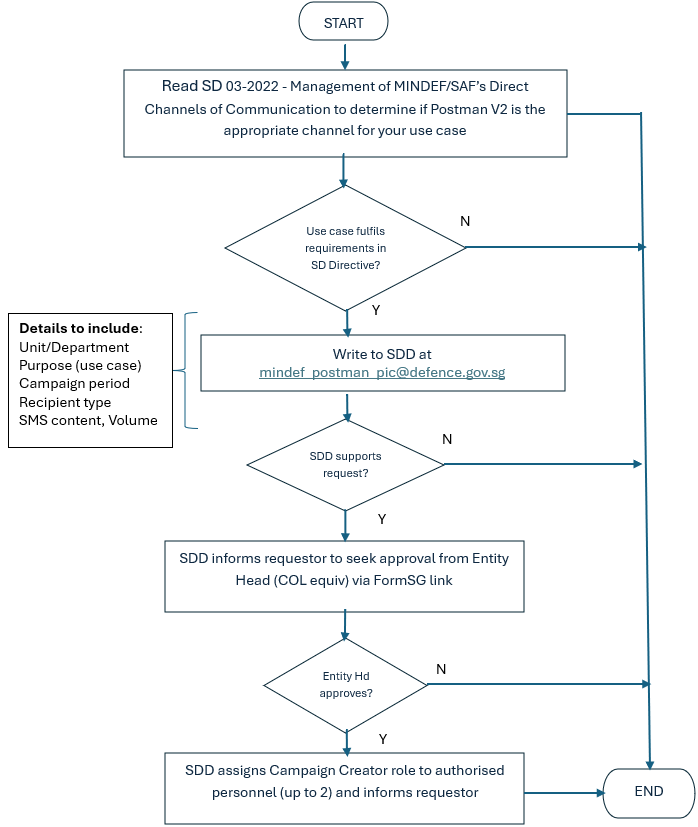
Write to SDD at mindef_postman_pic@defence.gov.sg
How do I gain access to Postman V2?
All MINDEF/SAF SMS use cases to citizens or mixed groups must be registered with the Service Delivery Division (SDD) at mindef_postman_pic@defence.gov.sg. An officer from SDD will get in touch with you to gather more information and provide guidance.
How long is the onboarding process?
SDD will grant the Campaign Creator role within three working days after the use case has been endorsed by the requestor's Department Head (Colonel-equivalent) and approved by SDD.
Can I deviate from the endorsing authority requirements stipulated in the directive [i.e., department head (COL-equivalent)]?
No.
Roles and Permissions
What can I do as a Campaign Creator in Postman V2?
As a Campaign Creator in Postman V2, you can:
Create and manage workspaces for your campaign
Add or remove Campaign Collaborators to your workspace
Create and edit API collections
Set up environment variables
Monitor API performance
Share collections with team members
Create and run automated tests
Generate API documentation
Export and import collections
Remember that you are responsible for:
Managing workspace access for your team
Ensuring proper use of the platform
Overseeing Campaign Collaborators' activities
Maintaining security of your workspace
What can I do as a Campaign Collaborator in Postman V2?
As a Campaign Collaborator in Postman V2, you can:
Access assigned campaign workspaces
View and use shared API collections
Send API requests
Use environment variables
Run existing tests
View API documentation
Fork collections (create personal copies)
Note: You cannot:
Create new workspaces
Add or remove other collaborators
Edit team-level environment variables
Delete shared collections
Modify workspace settings
All activities must comply with MDDI and MINDEF's policies and are monitored by your Campaign Creator.
Account Management
Who can be granted access to Postman V2 to create Campaigns to send SMS?
Only MINDEF/SAF employees can be granted access to Postman V2 to create Campaigns via the Campaign Creator role. Vendors, NSFs and NSmen are not considered MINDEF/SAF employees.
How many Campaign Creators can each unit/organising committee nominate?
Each unit/organising committee can nominate up to two Campaign Creators.
Who can be granted access to Postman V2 to assist Campaign Creators in sending SMS?
Campaign Creators may grant authorised vendors, NSFs and NSmen access to Postman to assist in sending and monitoring of SMS. They will assume the role of Campaign Collaborators (members).
How many Campaign Collaborators can each unit/organising committee nominate?
There is no system or policy limit on the number of Campaign Collaborators. It depends on the needs of each unit/organising committee. Units/organising committees should consider their operational requirements and ensure effective oversight of all collaborators.
Offboarding Process
How do I offboard from Postman V2 after a one-off event?
SDD will remove the system role from Postman V2 for the respective Campaign Creators immediately after the one-off event. They will no longer have access to Postman V2 thereafter.
Whom should we notify when Campaign Creators change during an active campaign?
Submit your request for change of Campaign Creator(s) through Request for Postman campaign creator rights to your superior for approval. After it is approved, SDD will update the Postman system and inform you accordingly.